How Accounts Payable Automation Reduces the Potential Risk of Fraud and Security Attacks
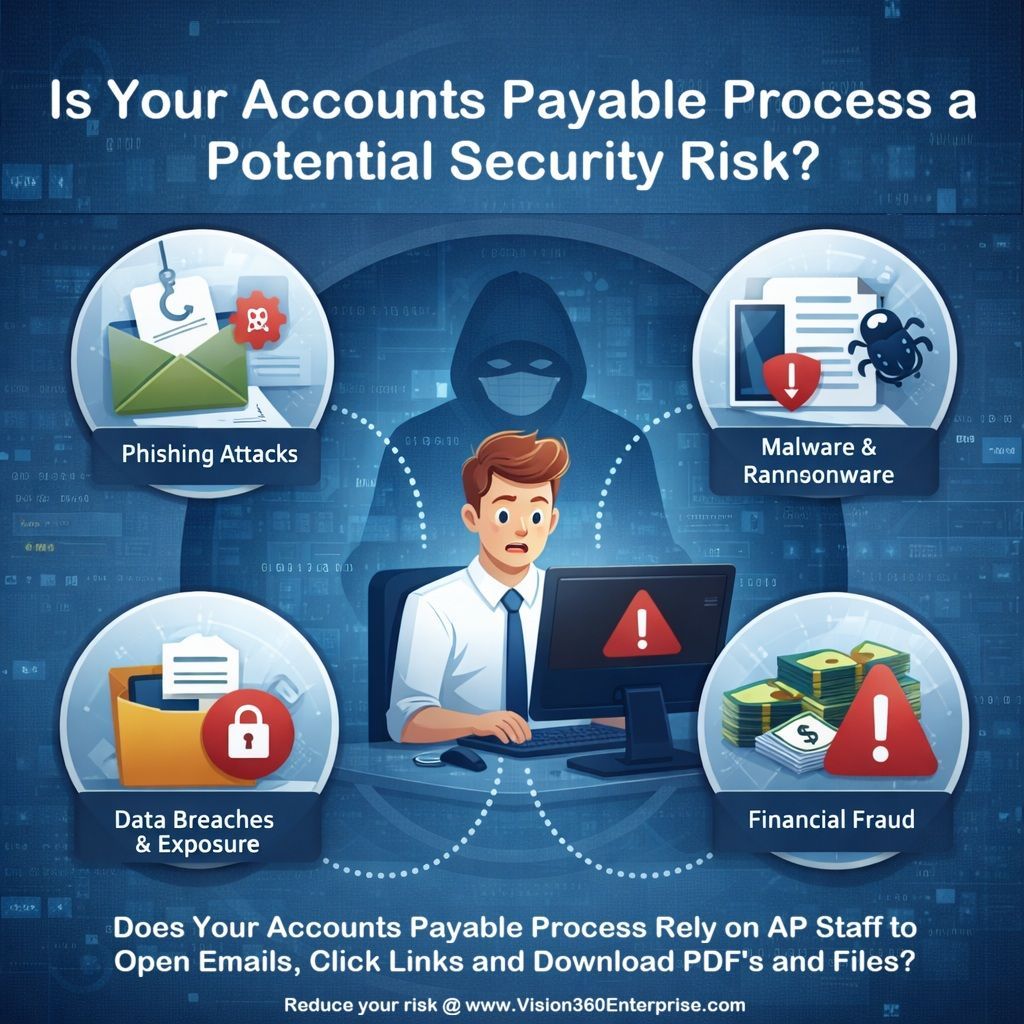
How Vision360 Accounts Payable Automation Reduces the Risk of Fraud and Security Attacks


In an era where cybersecurity threats are rising and financial fraud is increasingly sophisticated, organizations cannot afford to maintain antiquated, manual processes — especially in sensitive functions like accounts payable (AP). Manual invoice handling, paper-based approvals, and reliance on staff to open vendor emails, click links, and download attachments expose companies to unnecessary risk. Accounts payable automation has emerged as a key strategic defense, transforming financial operations while dramatically strengthening security and reducing fraud.


In this article, we explore how accounts payable automation reduces the risk of fraud and security attacks — in depth, with real examples, best practices, and essential explanations of how modern AP systems work. We will also discuss how Vision360 Enterprise, a leading AP automation solution, delivers enterprise-grade security while optimizing efficiency and accuracy.


1. Introduction


The accounts payable function touches every purchase that a business makes. From vendor invoices to payment execution, AP is a crossroads of financial data, sensitive information, banking credentials, and cash flow control. This makes it a prime target for fraudsters and cyber attackers.


For years, companies have relied on manual AP processes — paper invoices, spreadsheets, email exchanges, and physical approvals. While familiar, these traditional workflows are inherently insecure. They rely on human judgment and manual handling, which opens the door to error, oversight, data loss, and fraud.


Today’s digital transformation imperative is not just about efficiency — it’s about security, risk mitigation, and fraud prevention. Accounts payable automation solutions like Vision360 Enterprise combine robust controls, encrypted systems, digital workflows, and AI-powered fraud detection to close the gaps left by manual systems.


Before we dive further into how AP automation protects your organization, let’s first understand the threat landscape that organizations face.


2. The Current Threat Landscape for Accounts Payable


Increased digital connectivity has made it easier than ever for fraudsters to launch complex attacks targeted at financial processes. Some of the most common threats include:


  • Phishing & Business Email Compromise (BEC)


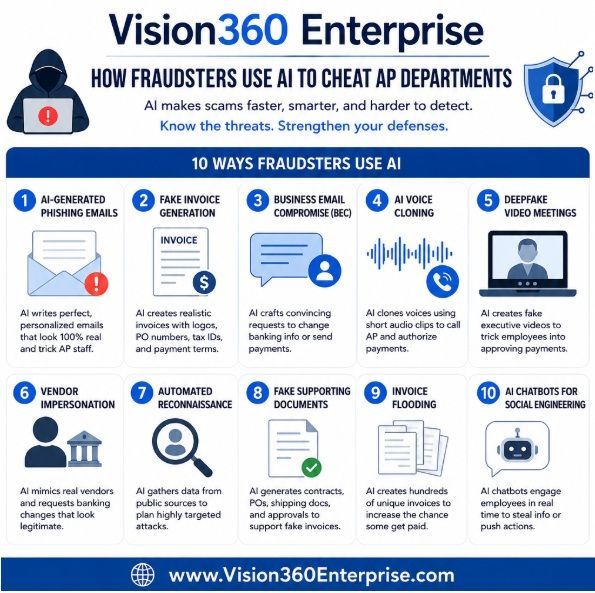
Phishing emails that impersonate vendors or executives are a leading cause of fraud in AP. Attackers often craft invoices that appear legitimate, tricking staff into authorizing payments to fraudulent accounts.


  • Malware & Ransomware


Attachments and links in emails can deliver malware — particularly ransomware — that locks financial systems and threatens data integrity unless a ransom is paid.


  • Unauthorized Access & Credential Theft


Weak password policies or single-factor authentication can expose accounts and systems to unauthorized access.


  • Invoice Manipulation & Duplicate Payments


Without strong controls, duplicate or altered invoices can be paid more than once or paid at inflated amounts.


  • Internal Fraud


Employees with excessive access rights can manipulate records or approve unauthorized payments if segregation of duties and controls are weak.


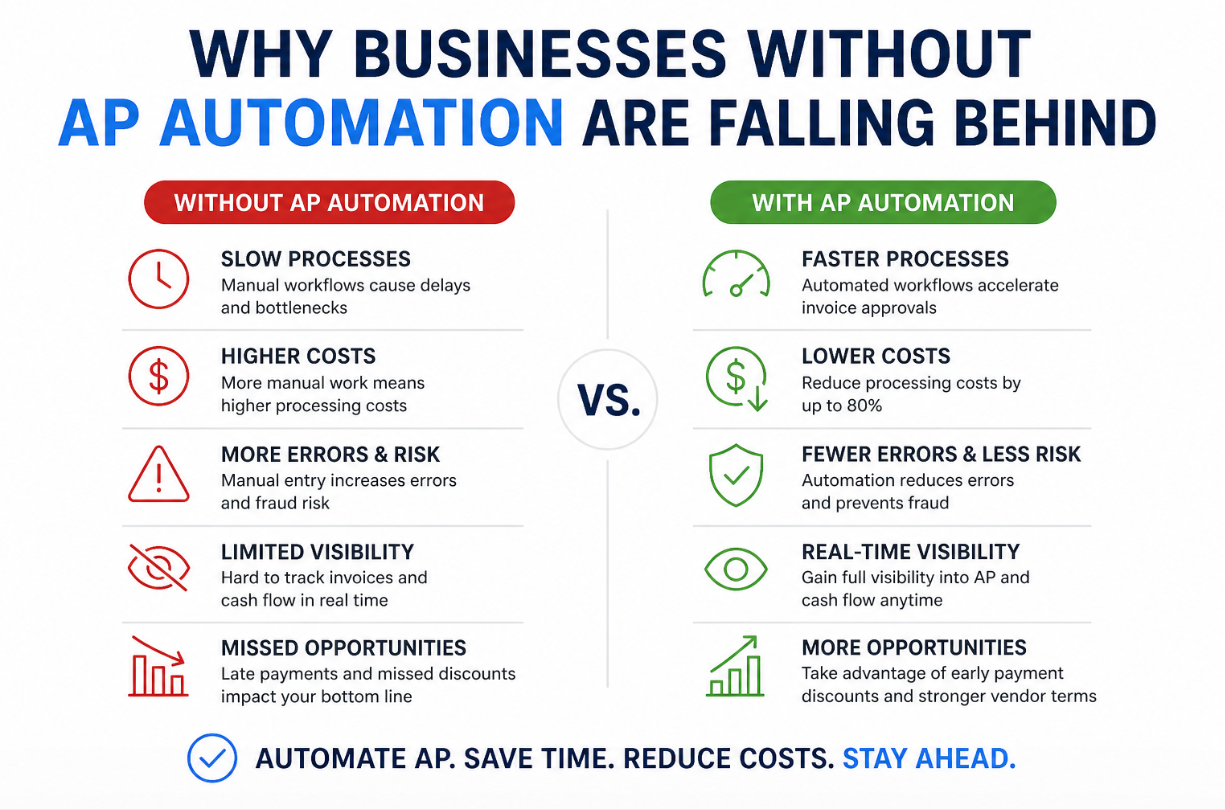
All of these threats increase the cost, complexity, and risk of financial operations. But the single biggest vulnerability across many organizations remains manual handling and email-based processes — the very workflows that automation seeks to replace.

Get More Information

3. How Manual AP Increases Security Vulnerabilities


Before automation, the typical AP workflow might look like this:


  1. Vendor sends an invoice via email or mail
  2. An AP staff member opens the email and downloads attachments
  3. The invoice is manually entered into an accounting system or spreadsheet
  4. Approvals are routed via email or paper
  5. Finance issues payment via check or bank transfer


Each step may look harmless on its own, but together they create a risky, fragmented process:


Risks of Manual AP


  • Email exposure: Staff must open vendor emails and attachments — a top vector for phishing and malware.
  • No centralized control: Paper-based or decentralized systems make audit tracking difficult.
  • Human error: Manual data entry leads to mistakes, including incorrect amounts or duplicate payments.
  • Limited visibility: Lack of real-time data increases the risk of unauthorized or overlooked activity.
  • Inefficient approvals: Email-based approvals can be bypassed, fabricated, or lost.


In this context, the AP department becomes a weak link, vulnerable to both external attacks and internal errors.


Accounts payable automation addresses these risks by structuring and securing every step of the process.


4. What Is Accounts Payable Automation?


Accounts payable automation refers to the use of software and digital workflows to handle the full lifecycle of vendor invoices — from receipt and approval to payment and reconciliation — without manual intervention. This includes:


  • Automated capture & OCR/AI data extraction
  • Electronic routing and approvals
  • Centralized digital repositories
  • Workflow rules and exception handling
  • Secure payment execution
  • Full audit trails and reporting


By reducing or eliminating paper, emails, and spreadsheets, AP automation not only improves efficiency — it also reduces risk, strengthens controls, and improves compliance.


Now let’s explore the many ways AP automation enhances security and prevents fraud.


5. Core Security Benefits of AP Automation

5.1 Eliminating Human Exposure to Phishing & Malicious Emails


One of the riskiest steps in manual AP is the requirement for staff to open vendor emails and engage with attachments and links. Attackers use this vector to distribute malware and orchestrate business email compromise schemes.


AP automation minimizes or eliminates the need for staff to interact with email-based invoices. Instead, invoices are:


  • Delivered into a secure, centralized system (via electronic portals or EDI)
  • Processed using automated data capture, not manual downloads
  • Routed through digital workflows rather than forwarded email chains


This significantly reduces the chance that an employee will inadvertently trigger a malware attack. Less exposure means fewer attack vectors.


5.2 Enforcing Segregation of Duties and Compliance Controls


Fraud prevention is not just about stopping external attacks — it’s also about controlling internal risk. Segregation of duties (SoD) is a fundamental internal control that requires separate people to handle key parts of a transaction.


Manual AP often lacks strong SoD because:


  • Approvals happen over email
  • Roles are loosely defined
  • Access to payment systems is not tightly controlled


With AP automation, roles and permissions are centrally managed. Approvers only see what they are authorized to see, and any attempts to bypass rules are logged and flagged. This dramatically reduces the risk that a single individual could manipulate company funds or records.


5.3 Secure Digital Workflows and Audit Trails


Paper and email workflows lack transparency and traceability. When something goes wrong, it can be difficult to determine what happened, where, and who was involved.


AP automation platforms provide:


  • Immutable audit logs for every activity
  • Time-stamped approvals and actions
  • Full visibility into the invoice lifecycle
  • Reports that support compliance and internal control frameworks


These audit trails help deter fraud because every action is recorded. They also make investigations and audits far more efficient.


5.4 Reducing Check and Payment Fraud


When payments are issued manually (especially paper checks), the risk of fraud increases:


  • Checks can be stolen and altered
  • Bank account numbers can be manipulated
  • Duplicate payments can be initiated unknowingly


Automated AP systems integrate with secure electronic payment networks and support controls like positive pay, two-factor authorization for payments, and encrypted bank credentials. This reduces the risk of unauthorized or fraudulent disbursements.


5.5 Data Encryption Across the Invoice Lifecycle


Sensitive financial data — vendor details, amounts, payment terms — must be protected both in transit and at rest.


Modern AP automation systems use:


  • Transport Layer Security (TLS/SSL) for data in motion
  • At-rest encryption for stored data
  • Role-based access control (RBAC)
  • Multi-factor authentication (MFA) for user login


These protections make it significantly harder for attackers to intercept or exploit sensitive information.


5.6 Centralized Vendor Master Controls


A common source of fraud is the creation of fraudulent vendor records — an unauthorized user adds a fake vendor and then creates bogus invoices to siphon funds.


AP automation platforms centralize and govern the vendor master file. Controls include:


  • Verification of vendors
  • Duplicate detection
  • Restricted editing rights
  • Approval workflows for vendor additions or changes


This prevents unauthorized entries and ensures vendor data integrity.


5.7 Real-Time Monitoring & Fraud Detection


AP automation platforms increasingly include machine learning and analytics tools to detect anomalies that may signal fraud — such as:


  • Duplicate invoices
  • Invoices above typical amounts
  • Multiple invoices with the same supporting document
  • Sudden changes in vendor information


These automated alerts allow finance teams to act before fraud escalates.


6. Key AP Automation Features for Enhanced Security


To fully realize the fraud-prevention benefits outlined above, look for these features in an AP automation platform:


Feature                                                                                            Security Benefit

-Automated OCR / AI Data Capture                                    -Eliminates manual entry, reduces exposure to malicious documents

-Role-Based Access Control (RBAC)                            -Restricts access based on job function

-Multi-Factor Authentication (MFA)                            -Adds a second layer of login security

-Digital Workflows with Approval Rules                            -Enforces internal controls and segregation of duties

-Audit Trails with Timestamps                                            -Full traceability for fraud investigation and compliance

-Encrypted Storage & Transmission                            -Protects data from unauthorized access

-Real-Time Analytics & Alerts                                            -Detects anomalies before losses occur

-Payment Controls & Positive Pay Integration            -Protects against check and payment fraud


These features are essential for robust AP security. Many leading solutions — including Vision360 Enterprise — provide them as part of a comprehensive platform.

Feature Benefit
Automated AI Data Capture Eliminates manual entry, reduces exposure to malicious documents
Role Based Access & Control Restricts access based on job function
Multi Factor Authenti Adds a second layer of login security
Digital Workflows with Approval Rules Enforces internal controls and segregation of duties
Audit Trails with Timestamps Full traceability for fraud investigation and compliance
Encryption & Data Protections Protects data from unauthorized access
Real-Time Analytics & Alerts Detects anomalies before losses occur


7. Vision360 Enterprise: Enterprise-Grade Security


Vision360 Enterprise is designed to protect organizations from the very risks that plague manual AP processes. By combining advanced automation with strong security controls, it delivers:


  • Secure Invoice Capture
  • Invoices bypass email exposure entirely, instead entering directly into the platform through secure upload or portal capture.
  • Automated Data Extraction
  • Intelligent AI and machine learning remove the need for manual entry — along with the risks that come with it.
  • Centralized Workflows
  • All approvals and exceptions are managed within the system, with clear visibility and defined approval paths.
  • Role-Based Permissions & MFA
  • Access is tightly controlled and monitored to ensure compliance with internal and regulatory requirements.
  • Audit-Ready Reporting
  • Every action has a timestamp, user ID, and context — providing full traceability and supporting internal audits.
  • Fraud Detection & Alerts
  • Built-in analytics surface unusual patterns that may indicate fraud, allowing finance teams to act proactively.

With Vision360 Enterprise, organizations don’t just automate AP — they fortify one of their most vulnerable financial functions.


8. Best Practices for AP Security and Fraud Prevention


Automation is powerful, but it should be combined with sound operational practices:


  • Train Your AP Staff
  • Even with automation, staff should understand fraud risks and how automated systems protect the organization.
  • Regularly Review Roles and Permissions
  • Ensure that access rights match current responsibilities.
  • Enable Multi-Factor Authentication
  • MFA significantly strengthens login security.
  • Monitor Alerts and Analytics
  • Timely response to anomalies can prevent losses.
  • Audit Vendor Master Files
  • Regularly clean and verify vendor records.
  • Integrate with Secure Payment Networks
  • Where possible, replace paper checks with secure, traceable electronic payments.


9. The ROI of Secure Accounts Payable Automation


Beyond fraud reduction, AP automation delivers measurable financial benefits:


  • Reduced processing costs
  • Fewer late payment penalties
  • Improved vendor relationships
  • Clearer cash flow visibility
  • Stronger compliance posture


When paired with risk mitigation and security improvements, the return on investment (ROI) of AP automation becomes even more compelling.


Conclusion


In a world of rising cyber threats and increasingly clever fraud schemes, maintaining manual accounts payable processes is a risk that no modern organization can afford. The vulnerabilities inherent in email-based workflows, paper invoices, and manual approvals make AP a prime target for attackers.


Accounts payable automation eliminates these vulnerabilities by securing every step of the invoice lifecycle — from capture and routing to payment and reconciliation. With features like encrypted storage, role-based access, audit-ready reporting, and fraud analytics, automation delivers both efficiency and security.


Solutions like Vision360 Enterprise provide the tools finance teams need to defend their organizations while driving operational excellence. In today’s security landscape, AP automation is not just a cost-saving initiative — it’s a strategic imperative.


12. Frequently Asked Questions (FAQs)


Can AP automation really prevent fraud entirely?

AP automation greatly reduces risk, but no system is 100% immune. However, automation combined with best practices makes fraud far less likely.


How does automation stop phishing attacks?

By removing the need for staff to manually open vendor emails and download attachments, automation closes the primary phishing vector.


Is automation suitable for small businesses?

Yes. Scalable AP automation solutions support organizations of all sizes with secure workflows. What is the biggest security benefit of AP automation?

Centralized control, auditability, and elimination of manual exposure are among the top benefits.


How quickly can an organization see results?
Many organizations see measurable fraud reduction and process improvements within weeks of implementation.


For More Information

How AI s Changing AP Automation
By Richard Pigott January 30, 2026
AI Accounts Payable automation that replaces manual invoice processing with intelligent data capture, adaptive workflows, and real‑time visibility
Why AI Data Capture Is Replacing OCR in Accounts Payable
By Richard Pigott December 9, 2025
In today’s AP environment, the question isn’t whether AI is better than OCR—it’s whether organizations can afford to keep using OCR at all.
By Richard Pigott November 12, 2025
Executive Summary: Why ERP-Native AP Automation Fails — and Why Vision360 Enterprise Wins ERP “AP Automation” promises simplicity but delivers shallow workflow. Vision360 Enterprise was built from the ground up to automate the entire invoice lifecycle — from intelligent capture to payment — delivering true AI-powered efficiency, faster ROI, and freedom from ERP lock-in. 1. ERP Vendors Build Breadth, Not Depth ERP systems manage everything — but master nothing. Vision360 Enterprise focuses solely on AP automation , achieving: 2–3× higher straight-through processing Faster adoption and measurable time-to-value Continuous AI learning and enhancement 2. ERP “Automation” = Manual Workflows in Disguise ERP modules digitize invoices but still depend on manual validation, GL coding, and exception routing. Vision360 Enterprise applies automated business rules and logic to achieve near-touchless processing. 3. ERP Customization = Permanent Technical Debt ERP automation success requires heavy scripting and consulting — each upgrade breaks it again. Vision360 Enterprise integrates natively, updates seamlessly, and eliminates technical debt. 4. ERP Lock-In Limits Agility ERP automation binds you to one vendor and one process. Vision360 Enterprise connects across multiple ERPs, entities, and regions — providing agility through change. 5. Vision360 Enterprise Delivers Measurable ROI 70–80% fewer manual AP touches 50–60% faster invoice cycle times 2× early-payment discount capture Payback in under 12 months Conclusion: ERP vendors digitize invoices. Vision360 Enterprise automates intelligence. For finance leaders serious about eliminating manual work, improving visibility, and future-proofing their payables process — Vision360 Enterprise is the clear strategic choice.
By Richard Pigott October 31, 2025
Every month-end, accounting teams face the same challenge: closing the books quickly, accurately, and in compliance with reporting standards. But one recurring issue often slows things down — missing accruals. If you’ve ever been asked by accounting to “send your accruals,” it’s not just a formality. Your accruals are essential to producing an accurate picture of the company’s financial health. What Are Accruals? Accruals represent expenses that have been incurred but not yet invoiced or paid. They align costs to the correct accounting period — ensuring financial results accurately reflect when the work was done or the goods were received. Without accruals, one month’s profit may look inflated while the next month is overstated — skewing performance metrics, budgets, and forecasts. Why Accounting Needs Your Accruals 1. To Ensure Accurate Financial Reporting Accruals help accounting record expenses in the period they were incurred, not when invoices arrive. This ensures management and stakeholders see the company’s true financial position. 2. To Avoid Budget and Forecast Distortions When expenses are recognized late, they show up in the wrong month — confusing budget owners and making forecasts unreliable. Timely accruals keep budgets aligned and predictable. 3. To Accelerate the Month-End Close Every missing accrual adds hours or even days to the close process. Submitting accruals promptly helps accounting close faster, deliver timely reports, and support better business decisions. 4. To Maintain Compliance and Audit Readiness Auditors look for complete and consistent expense recognition. Well-documented accruals show adherence to GAAP or IFRS standards and demonstrate strong financial controls. 5. To Strengthen Collaboration Between Finance and Operations Submitting accurate accruals isn’t just helping accounting — it’s helping your entire business operate with transparency and precision. Best Practices for Submitting Accruals Track pending costs: Keep notes on goods or services received but not yet invoiced. Communicate early: Let accounting know about large or recurring expenses before month-end. Meet deadlines: Submit accrual details on time to support a smooth close process. Vision360 Enterprise: Using an AP Automation system like Vision360 Enterprise allows centralized processing of supplier invoices which allows accounts payable visibility and control with the ability to generate accruals instantaneously. The Bottom Line Accruals are more than a technical accounting task — they’re the foundation of financial accuracy. When every department participates in the accrual process, the result is faster closes, cleaner reports, and better business decisions. So next time accounting asks for your accruals, remember: they’re not chasing paperwork — they’re protecting accuracy, compliance, and the integrity of the numbers.
By Richard Pigott October 28, 2025
Be honest: Does your Accounts Payable process still rely on paper, email approvals, and manual data entry? If so, your AP process might be stuck in 1999 — while the rest of finance has moved decades ahead. In today’s fast-paced, AI-driven finance world, AP automation isn’t optional anymore — it’s essential. Here are five signs your Accounts Payable process needs automation, and how modern finance teams are transforming their workflows with AI-powered invoice processing and automated approval systems. 1. You’re Still Digging Through Emails or Paper Invoices If your team still receives invoices as PDFs, attachments, or even paper copies, you’re stuck in a pre-cloud era. Back in 1999, mail and fax were standard. But in 2025, manual invoice handling wastes time, increases data entry errors, and limits visibility. Modern AP automation systems use intelligent data capture, AI and OCR technology to automatically extract and validate invoice data — no typing, no spreadsheets, no missing files. Why it matters: Eliminates manual entry and human error Prevents lost or duplicate invoices Speeds up processing and approvals Modern alternative: A cloud-based invoice capture service that imports invoices automatically and syncs them directly with your ERP or accounting platform. 2. Approvals Still Depend on Email Threads or Paper Signatures If managers still approve invoices by replying to emails or signing paper copies, your invoice approval workflow hasn’t changed in 25 years. Today’s AP automation platforms use automated approval workflows that route invoices instantly based on predefined rules — by department, spend threshold, or GL code. Every action is tracked, timestamped, and auditable. Benefits of automation: Instant routing and escalation Full visibility for AP and management Clear audit trail and compliance record Modern alternative: Rules-based approval automation that eliminates delays, reduces bottlenecks, and ensures on-time payments. 3. You Have Little or No Real-Time Visibility Into Payables In 1999, waiting for end-of-month reports was normal. But in 2025, real-time visibility into payables is mission-critical for cash flow and forecasting. If you’re still updating spreadsheets or manually reconciling data, you’re missing the insights needed to manage spend effectively. Modern Accounts Payable automation dashboards show invoice statuses, exception alerts, and payment readiness in real time — no waiting, no guesswork. Why visibility matters: Prevents late payments and cash surprises Supports better decision-making Strengthens supplier relationships Modern alternative: A real-time AP analytics dashboard that delivers instant insight into outstanding invoices, payments, and workflow performance. 4. You’re Still Cutting Paper Checks or Logging Into Multiple Portals If your AP team still prints checks or logs into multiple banking portals to make payments, you’re wasting hours on tasks that modern payment automation systems can do in seconds. In 1999, that was standard. Today, automated payment processing securely matches invoices to purchase orders, schedules payments, and reconciles accounts automatically. Why automate payments? Reduces fees, errors, and fraud Improves supplier satisfaction Speeds up month-end close Modern alternative: End-to-end payment automation that manages ACH, virtual cards, and digital payments directly from your AP automation platform. 5. Your AP Team Is Overworked and Undervalued If your Accounts Payable team spends most of their time keying data, chasing approvals, and answering vendor questions, they’re working harder — not smarter. AI in Accounts Payable eliminates repetitive work, empowers staff, and shifts focus toward higher-value activities like supplier analysis and cash management. Benefits of AI-powered AP workflows: 70–80% fewer manual tasks Lower risk of data errors Happier, more productive teams Modern alternative: AI-driven AP automation software with intelligent routing, exception handling, and self-service supplier portals. The Bottom Line: 1999 Processes Can’t Compete in 2025 and Beyond. Finance has evolved. Paper-based, manual Accounts Payable processes haven’t. Modern AP automation solutions deliver speed, accuracy, and real-time visibility across the entire invoice-to-pay cycle. By embracing AI and automated workflows, you build a finance operation that’s smarter, faster, and future-proof. If your current AP workflow shows even one of these five signs, it’s time to automate — because 2025-ready finance teams don’t just process invoices, they analyze, optimize, and innovate. Next Steps: Modernize Your Accounts Payable with AI Audit your current AP workflow — find bottlenecks, delays, and data entry points. Calculate your manual processing cost — time, errors, and lost discounts add up. Explore AI-powered AP automation software that integrates with your ERP and provides full visibility. Don’t let your Accounts Payable team operate like it’s still 1999. Modernize with AI-driven AP automation to reduce costs, accelerate approvals, and empower your finance team. If you’re ready to see how AI-powered AP Automation can transform your finance operations, book a demo or schedule a workflow assessment . We’ll show you how to eliminate manual processes, reduce costs, and bring your Accounts Payable process into the modern era.
AP Automation in Healthcare
By Richard Pigott September 22, 2025
Discover how AP automation helps healthcare cut costs, improve compliance, prevent fraud, and free staff to focus on patient care.
By Richard Pigott September 5, 2025
Accounts Payable Workflow vs. AP Automation: What’s the Difference?
Coupa Invoice Data Entry
By Richard Pigott August 29, 2025
Enhance Your Coupa Investment by Eliminating Manual Invoice Entry
By Richard Pigott June 19, 2025
Creative, Manual-Free Strategies In today’s hyper-efficient business landscape, automation often steals the spotlight when it comes to streamlining Accounts Payable (AP). But what if you're not ready for automation—or prefer to avoid the cost, complexity, or integration headaches that come with implementing an AP workflow system? There are still plenty of non-automated ways to dramatically improve AP efficiency. Many of these methods are process-based, culture-driven, or leverage existing tools in creative ways. Below, we explore smart, often-overlooked strategies that reduce manual work without a single line of code or automation software. 1. Centralize and Standardize All AP Policies and Procedures Why it matters: Inconsistent invoice handling is a key source of manual work. What to do: Create a comprehensive AP manual with step-by-step instructions for handling invoices, approvals, disputes, vendor queries, and accruals. Ensure all stakeholders (AP clerks, department heads, vendors) are trained on these standards. Mandate standard formats for POs and invoices, with clearly defined required fields. ✅ Pro Tip: Use visual SOPs (standard operating procedures) and flowcharts to make procedures easier to follow—no software needed. 2. Shift the Burden to Vendors — Implement a “Vendor Self-Service” Mindset Why it matters: Many AP inefficiencies stem from missing or incorrect vendor data. What to do: Require vendors to submit invoices in a standardized format (e.g., PDF with PO in subject line). Mandate that vendors populate a standardized invoice cover sheet, downloadable from your website or included in onboarding kits. Set up a dedicated email address and strict submission guidelines to reduce email-based clutter. ✅ Out-of-the-box idea: Create a “Vendor Onboarding Kit” with instructions, sample invoice formats, W-9 forms, and FAQ. This shifts data entry and compliance upstream. 3. Eliminate Paper at the Source (Without Automation) Why it matters: Paper introduces delays, errors, and storage headaches. What to do: Close physical mailboxes for AP. Ask vendors to stop mailing invoices altogether. Use scanners and shared drives (like Google Drive or SharePoint) to store invoices. Ask internal stakeholders to submit invoice images from mobile phones when traveling or in the field. ✅ Out-of-the-box idea: Empower the front desk or mailroom to reject paper invoices on arrival and direct vendors to the proper digital channels. 4. Create a “PO-First” Culture Why it matters: Non-PO invoices require more review and often bypass pre-approval processes. What to do: Make POs mandatory for all purchases over a low threshold (e.g., $200). Publish a company-wide “No PO, No Pay” policy—and enforce it rigorously. Educate department heads and project managers on how and when to request POs. ✅ Bonus: Use Excel-based PO logs with pre-defined templates. No fancy software needed—just consistency. 5. Adopt Calendar-Driven Invoice Processing Cycles Why it matters: Processing invoices on a rolling basis leads to chaos. What to do: Establish weekly invoice intake days (e.g., Tuesday/Thursday only). Allocate specific days of the month for approvals, accruals, and vendor payments. Let vendors know your “invoice cut-off days” and stick to them. ✅ Out-of-the-box idea: Set up a shared team calendar (Google, Outlook) to visually track invoice cycles and deadlines. 6. Assign “Invoice Champions” by Department Why it matters: Chasing down approvals and missing GL codes is a huge time sink. What to do: Designate an Invoice Champion in every department who owns responsibility for coding and approving invoices. Provide them with GL code cheat sheets, training, and expectations around turnaround time. Use internal SLA (service level agreement) metrics to encourage fast action. ✅ Clever twist: Reward champions with shout-outs or small bonuses for timely approvals and clean submissions. 7. Use Color-Coded Physical Tools for In-Office AP Why it matters: Visual systems reduce the need for constant verbal clarification. What to do: Use colored folders, stamps, or bins to indicate invoice status: needs approval, ready to pay, disputed, etc. Place folders in designated locations by department or approver. Rotate colors monthly to track invoice age. ✅ Old-school, but effective: Implement a “red folder” system to immediately flag urgent invoices or disputes. 8. Build Smart Templates in Excel or Google Sheets Why it matters: Manual entry errors eat time and cause payment delays. What to do: Create pre-formatted invoice registers with dropdowns for GL codes, departments, and vendors. Use data validation and conditional formatting to highlight missing fields or errors. Maintain a vendor master file with up-to-date banking and contact info. ✅ Out-of-the-box idea: Use Google Forms to collect invoice data and auto-fill a spreadsheet for processing. 9. Host Monthly “Invoice Review Huddles” Why it matters: One-time fixes don’t solve systemic inefficiencies. What to do: Hold short monthly meetings with AP, procurement, and department heads to review: Top 10 slowest invoices Recurring vendor issues Approval bottlenecks Use these to adjust policies, retrain teams, or escalate chronic issues. ✅ Culture shift: Treat AP like a business partner, not a back-office task. 10. Tame Email Chaos with Smart Labeling and Filters Why it matters: Invoices get lost in crowded inboxes. What to do: Create inbox rules to label, sort, and auto-archive AP emails. Designate an AP triage person who checks email twice daily and logs incoming invoices to a master sheet. Avoid forwarding—stick to centralized viewing folders. ✅ Bonus: Use naming conventions like “INV_[Vendor]_[Date]” to make searching painless. Final Thoughts Automation isn’t the only path to AP efficiency. With a strategic mindset and creative thinking, AP departments can eliminate manual tasks, improve accuracy, and even elevate their internal reputation—all without investing in software. The real key is structure, discipline, and shifting effort to where it adds the most value: early in the process, not at the point of payment.